
What Is the Floorp Browser? How It Differs From Firefox
· Updated · 6 min read
Contents
Floorp is Firefox with a workflow layer on top. It takes Mozilla’s Firefox, keeps Gecko and the extension ecosystem, and adds tools for people who spend their working day inside a browser: workspaces, a sidebar for pinned sites, and a lot of control over the interface.
The case for Floorp is narrower than it was a year ago, because Firefox has absorbed some of what used to set it apart. What is left is still worth knowing about, and so is the one real risk: the project rests on a very small team.
What Floorp is
Floorp is a free, open-source browser started in Japan in 2021 by Ryosuke Asano. The code is on GitHub under the Mozilla Public License 2.0, the same licence Firefox uses. It runs on Windows 10 and 11, macOS 10.15 or later, and Linux. An iOS version is in testing through TestFlight, and there is no Android version.
Until 2025, Floorp followed Firefox ESR, the slow-moving enterprise branch. With Floorp 12, released in August 2025, it moved to Firefox’s rapid release channel. The upgrade notes give the reason: ESR 128, which Floorp 11 was built on, had reached end of life and no longer received security fixes. Floorp now ships new Firefox features sooner, and breaks more often when Firefox changes underneath it. At the time of writing, the latest release is 12.20.1, published on 9 October 2026.
What it adds to Firefox
Workspaces
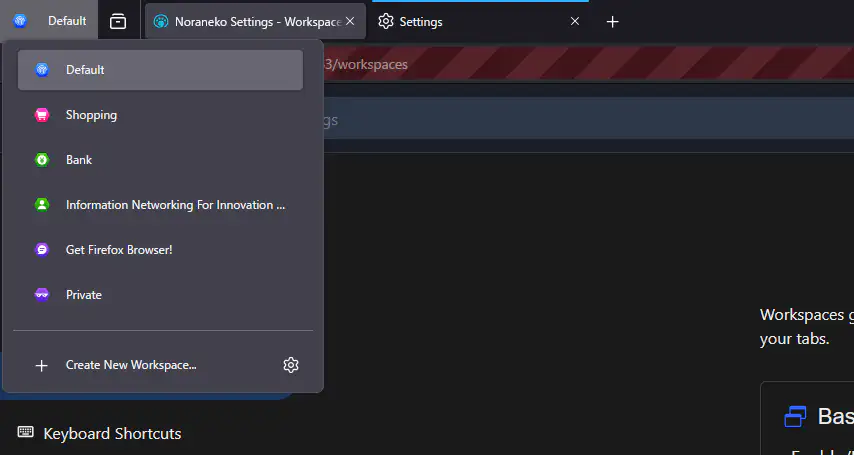
Workspaces group tabs by context. You create a workspace called "Client" or "Research", and only its tabs are visible in the window. Tabs in the other workspaces stay open in the background. Since Floorp 11.4 a workspace can be tied to a Firefox Multi-Account Container, so a workspace is also a separate cookie and sign-in jar. That combination is the strongest idea in Floorp: one browser, one profile, and a clean split between work and personal accounts.
There are limits. According to the documentation, the list of workspaces is shared across windows of one profile, but the tabs are not.
Panel Sidebar
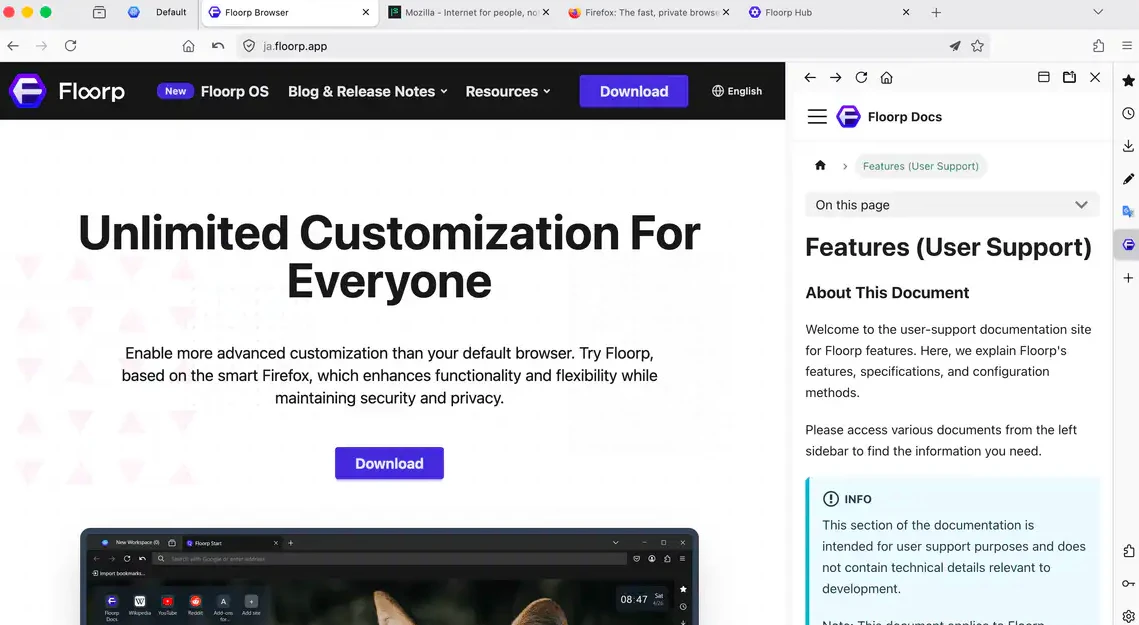
The Panel Sidebar holds websites you register in advance and opens any of them beside the current page with one click. A translation tool, a documentation site or a chat client works well here. Each panel can use its own container, its own width and a mobile user agent, and a floating mode lays the panel over the page. The documentation is direct about the reason it exists: Firefox has split view now, but setting it up each time is tedious, and a registered panel is one click.
Interface control
Floorp ships several themes, with Lepton as the default, and it enables userChrome.css out of the box, so you can restyle the browser with your own CSS. The tab bar can be horizontal, vertical or multi-row, and can sit at the top, under the toolbar, or at the bottom of the window. Everything Floorp-specific lives on one page, about:hub, apart from Firefox’s own settings.
The new tab page is also Floorp’s own, called Floorp Start: a random background image, a clock and your top sites. If you prefer Firefox’s page, there is a switch for it under Tab & Appearance in the Hub, and a restart applies it.
Chrome extensions
Since version 12.11 in March 2026, opening the Chrome Web Store in Floorp shows an "Add to Floorp" button. The release notes warn that Firefox and Chrome use different APIs, so some extensions will not install or will not work correctly. Treat it as a fallback for an extension that has no Firefox version.
What Firefox now covers
Floorp used to have its own split view and its own vertical tabs. Both are gone. The split view was removed in the 12.8 series because Firefox implements it natively, and vertical tabs were removed in Floorp 12 for the same reason. You can still use vertical tabs in Floorp, but through Firefox’s implementation, which lives in the sidebar area and is not designed to be always visible.
If vertical tabs or split view were what drew you to Floorp, plain Firefox now gives you most of it. What Floorp keeps is the workspace and container pairing, the Panel Sidebar and the amount of interface control.
Privacy
Floorp inherits Firefox’s protections, and its privacy policy says the desktop build disables Mozilla telemetry and health report uploads by default. Updates, search and sync still make network requests. One detail from the policy is worth knowing: when a new-tab shortcut or web panel has no icon, Floorp may ask Google’s favicon service for one, and for web panels the request can include the full URL. Sync is Mozilla’s, end-to-end encrypted, so a Firefox account you already have works in Floorp.
Floorp or Firefox
Both run on Gecko, both are open source, and both load the same sites and the same extensions. The difference is in how much of the browser you want to arrange yourself.
| Area | Floorp | Firefox |
|---|---|---|
| Engine and licence | Gecko, MPL-2.0 | Gecko, MPL-2.0 |
| Workspaces with containers | Built in | Containers via Mozilla’s extension, no workspaces |
| Registered site panels | Panel Sidebar | Split view, set up per use |
| Vertical tabs, split view | Firefox’s own | Native |
| Interface themes and CSS | Themes, userChrome.css on by default |
Limited |
| Maintainers | One lead, a handful of contributors | Mozilla |
Choose Floorp if you keep several accounts and contexts in one browser and you want the sidebar and the layout your way. Choose Firefox if you want a browser you open and forget.
The risk is the team
The contributor list shows what the project is. On GitHub, Asano has about 1,300 contributions and the next contributor about 340. In May 2025 he moved Floorp out from under Ablaze into a partnership, so that the project is led directly by Floorp itself. In the same post he writes that users worry about the project disappearing and that he intends to maintain it for as long as he can. He means it, but it rests on one person.
For a browser the practical question is how quickly security fixes from Mozilla reach users. Floorp tracks the rapid release channel, which is the right call, but it depends on a very small number of people merging each upstream change. If you handle sensitive accounts, keep that in mind and keep auto-update on.
The smaller friction is Floorp 12’s rapid release base: an upstream change can break a Floorp feature for a release or two. The upgrade guide also lists a known clash between the built-in mouse gestures and gesture extensions on macOS and Linux, with a workaround in about:config.
Installing and updating
The Windows installer is signed with an open-source code signing certificate, and winget and Scoop packages exist. On macOS the build is notarised and updates itself, and Homebrew has a cask. On Linux the options are a PPA for Ubuntu and Mint, Flatpak, a tarball, and unofficial AUR packages. The README lists the commands. Windows builds are x86_64 only, so Windows on ARM is not supported.
Trying it
I have not used Floorp as my main browser, so this article is based on its documentation, release notes and source rather than long daily use. If you want to test it, install it next to your current browser from floorp.app and import your bookmarks with the built-in tool. Use it for a few days and see whether workspaces and the Panel Sidebar change how you work. If they do not, nothing is lost: Firefox and its data stay where they were.